Business Analysis Tools: A Complete Guide to the Best Tools
G
GeoRenus Editorial Team
1,056 views
GeoRenus Editorial Team
Business analysis tools help organizations identify needs, model processes, collaborate effectively, and visualize data for better decision-making. This guide covers the top tools including Jira, Confluence, Trello, Balsamiq, Microsoft Visio, Wrike, Bizagi Modeler, and more, with details on features, pricing, and best use cases.
In the modern business landscape, making decisions without data is like navigating a ship without a compass. Business analysis tools have become the backbone of how organizations identify needs, solve problems, and drive strategic growth. Whether you are a seasoned business analyst or a project manager looking to streamline workflows, the right set of tools can mean the difference between a project that thrives and one that flounders.
According to a report by the International Institute of Business Analysis (IIBA), over 70% of organizations now rely on dedicated business analysis tools to support decision-making and requirements management. That statistic alone tells you how central these tools have become. But with dozens of options on the market, from free open-source solutions to enterprise-grade platforms, choosing the right one can feel overwhelming.
This guide walks you through everything you need to know: what business analysis really is, why the tools matter, the different categories available, and a detailed look at the top tools professionals use today. Think of it as your one-stop reference for building a smarter, more efficient analysis toolkit.
Before diving into the tools, it helps to understand the discipline they serve. Business analysis is the practice of identifying business needs and determining solutions to business problems. These solutions often include a software-systems development component but can also consist of process improvements, organizational changes, or strategic planning.
The Business Analysis Body of Knowledge (BABOK Guide) defines it as "the practice of enabling change in an enterprise by defining needs and recommending solutions that deliver value to stakeholders." In simpler terms, a business analyst acts as a bridge between what the business wants and what the technical team builds.
For example, imagine a retail company that notices declining online sales. A business analyst would gather data, interview stakeholders, map out current processes, identify bottlenecks in the customer journey, and then recommend specific changes, whether that is a website redesign, a new payment gateway, or improved inventory management. The tools listed in this guide are what make that entire workflow possible at scale.
You might wonder: can't a business analyst just use spreadsheets and email? Technically, yes. Practically, no. Modern projects are too complex, too fast-moving, and involve too many stakeholders for manual methods alone. Business analysis tools bring structure, speed, and collaboration to the table. But not every tool is created equal. Here are the key factors to consider when evaluating them.
The first question to ask is: what do you need the tool to accomplish? Some tools are designed for requirements gathering, while others focus on process modeling, data visualization, or project tracking. A 2023 survey by PMI found that 37% of projects fail due to a lack of clearly defined objectives. Choosing a tool that aligns with your project objectives, whether that is capturing user stories, mapping workflows, or tracking deliverables, dramatically improves your chances of success.
A tool is only as good as its adoption rate. If the interface is clunky or unintuitive, team members will avoid it, and you will end up with incomplete data. Look for tools with clean dashboards, drag-and-drop functionality, and minimal learning curves. For instance, Trello's card-based interface is so simple that new users can start organizing tasks within minutes, which is a big reason why over 50 million people use it worldwide.
The heart of any business analysis tool lies in its analytical capabilities. Can it generate reports? Does it support SWOT analysis frameworks? Can it handle large datasets and produce meaningful visualizations? Tools like Microsoft Power BI and Tableau are built specifically for deep analytics, while others like Jira offer built-in reporting dashboards that track velocity, burndown charts, and sprint progress. The best choice depends on how data-intensive your analysis work is.
In today's remote and hybrid work environment, mobility is no longer optional. A Gartner study revealed that 82% of company leaders plan to allow remote work at least part of the time. Your business analysis tools need to work seamlessly across devices, whether that is a laptop in the office, a tablet during a client meeting, or a phone while commuting. Cloud-based tools like Confluence, Wrike, and Trello excel here because they sync in real time across all platforms.
No tool exists in a vacuum. Your business analysis platform needs to play well with the rest of your tech stack, think CRM systems like Salesforce, communication tools like Slack or Microsoft Teams, and development platforms like GitHub. For example, Jira integrates natively with over 3,000 apps through the Atlassian Marketplace, making it a hub that connects requirements gathering, development tracking, and stakeholder communication in one ecosystem.
Business analysis tools are not monolithic. They fall into distinct categories based on the phase of analysis they support. Understanding these categories helps you build a well-rounded toolkit rather than relying on a single platform for everything.
These tools help analysts understand what the organization actually needs before any solution is designed. They support activities like stakeholder interviews, requirements elicitation, gap analysis, and feasibility studies. IBM Rational RequisitePro is a classic example: it allows teams to document, trace, and manage requirements throughout the project lifecycle. Similarly, tools like SurveyMonkey or Google Forms can serve as lightweight needs assessment instruments for gathering stakeholder input quickly.
Once needs are identified, the next step is modeling, which means creating visual representations of business processes, workflows, and systems. Business Process Model and Notation (BPMN) is the industry standard here. Tools like Bizagi Modeler and Microsoft Visio allow analysts to create detailed flowcharts, data flow diagrams, and organizational models. According to Forrester Research, organizations that use process modeling tools reduce process improvement cycle times by up to 50%.
Business analysis is inherently collaborative. Analysts work with developers, testers, project managers, and business stakeholders simultaneously. Collaboration tools like Confluence, Trello, and Wrike provide shared workspaces where documents, requirements, and feedback live in one place. "The single biggest problem in communication is the illusion that it has taken place," George Bernard Shaw famously said. These tools help ensure communication actually happens, with audit trails, comments, and version history to prove it.
Raw data means nothing if stakeholders cannot understand it. Data visualization tools transform numbers and datasets into charts, graphs, heatmaps, and interactive dashboards that tell a story. Microsoft Excel remains the most widely used tool for basic visualization, but platforms like Tableau and Power BI take it further with advanced interactive features. A well-designed visualization can communicate in seconds what a 50-page report fails to convey in hours.
Now for the part you have been waiting for. Below is a detailed breakdown of the most widely used business analysis tools, covering what each does, what it costs, who it is best for, and what sets it apart from the competition.
Jira and Confluence, both developed by Atlassian, are arguably the most popular duo in the business analysis and project management space. Jira is used by over 75,000 customers globally, including companies like Spotify, Airbnb, and NASA.
Jira is primarily an issue and project tracking tool built for agile teams. Business analysts use it to create and manage user stories, track bugs, plan sprints, and generate burndown charts. Its customizable workflows mean you can tailor it to fit Scrum, Kanban, or any hybrid methodology your team uses.
Confluence, on the other hand, is a knowledge management and documentation platform. It serves as the central repository where business requirements documents (BRDs), functional specifications, meeting notes, and project wikis live. When integrated with Jira, every requirement in Confluence can be linked directly to a Jira ticket, creating full traceability from concept to delivery.
Pricing: Jira offers a free plan for up to 10 users. Standard plans start at $7.75 per user per month, while Premium plans run at $15.25 per user per month. Confluence follows a similar pricing structure. Best for: Agile teams that need end-to-end traceability from requirements to deployment.
Trello is the tool you reach for when you need simplicity without sacrificing functionality. It uses a Kanban-style board with cards and lists to organize tasks, making it visually intuitive and incredibly easy to adopt. Trello has over 50 million registered users and is used in over 190 countries.
For business analysts, Trello shines in early-stage project planning and requirements organization. You can create a board for a project, add lists for different phases like Discovery, Analysis, Design, and Development, and then populate each list with cards representing individual tasks or requirements. Each card supports attachments, checklists, due dates, labels, and comments.
What makes Trello unique is its Power-Ups feature, which adds integrations with tools like Slack, Google Drive, Jira, and Salesforce. The Butler automation feature lets you create rules like automatically moving a card to Done when all checklist items are marked complete.
Pricing: The free tier is generous and sufficient for small teams. Standard plans cost $5 per user per month, and Premium plans cost $10 per user per month. Best for: Small to mid-sized teams that want a lightweight, visual project management tool without a steep learning curve.
Balsamiq is a wireframing tool that helps business analysts and designers sketch out user interfaces before any code is written. It deliberately uses a hand-drawn, low-fidelity style to keep the focus on layout and functionality rather than pixel-perfect design. "Balsamiq wireframes are meant to look like sketches on a napkin, and that is exactly the point," says founder Peldi Guilizzoni.
This tool is invaluable during the requirements phase. Instead of describing what a screen should look like in a 10-page document, an analyst can create a wireframe in minutes and share it with stakeholders for instant feedback. Balsamiq offers a library of pre-built UI components like buttons, text fields, navigation bars, and tables that you drag and drop into place.
Pricing: Balsamiq Cloud starts at $9 per month for 2 projects. The desktop version is a one-time purchase of $89. Best for: Business analysts who need to quickly communicate UI concepts to stakeholders and development teams without relying on a UX designer.
If Balsamiq is the paid wireframing champion, Pencil Project is its free, open-source counterpart. Pencil Project allows you to create mockups, wireframes, and prototypes for desktop and mobile interfaces without spending a dime. It supports a wide range of built-in shapes, flowchart elements, and UI stencils for platforms like Android, iOS, and web applications.
One standout feature is its ability to export diagrams to multiple formats including PNG, PDF, SVG, and even HTML. It also supports inter-page linking, which means you can create clickable prototypes that simulate navigation between screens, a feature typically reserved for premium prototyping tools.
Pricing: Completely free and open source. Best for: Budget-conscious teams or freelance business analysts who need wireframing and prototyping capabilities without a subscription fee.
Microsoft Visio has been the gold standard for diagramming and process modeling for decades. It is the go-to tool for creating flowcharts, org charts, network diagrams, floor plans, and BPMN diagrams. Visio has been part of the Microsoft ecosystem since 2000 and is used by millions of professionals worldwide.
For business analysts, Visio is particularly powerful for process mapping. You can model current-state and future-state processes, identify redundancies, and communicate complex systems visually. Its tight integration with Microsoft 365 means you can embed Visio diagrams directly into Word documents, PowerPoint presentations, and SharePoint sites.
Visio also supports data-linked diagrams, where shapes in your diagram can be connected to external data sources like Excel, SQL Server, or SharePoint. This means your process maps can automatically update when underlying data changes, turning static diagrams into living dashboards.
Pricing: Visio Plan 1 (web only) costs $5 per user per month. Visio Plan 2 (desktop and web) costs $15 per user per month. Best for: Enterprise teams already in the Microsoft ecosystem that need robust diagramming and process modeling capabilities.
Wrike is a versatile project management and collaboration platform that sits at the intersection of task management, resource planning, and real-time collaboration. Wrike is trusted by over 20,000 organizations including Google, Hootsuite, and Tiffany & Co.
What sets Wrike apart for business analysts is its ability to handle complex, cross-functional projects. You can create custom workflows, set up approval processes, use Gantt charts for timeline planning, and generate real-time analytics dashboards. Wrike's request forms feature is especially useful for intake management, allowing stakeholders to submit requests that automatically populate as tasks with all the necessary details.
Wrike also offers proofing tools for reviewing visual assets, time tracking for resource management, and advanced reporting features that let you slice and dice project data by team, timeline, priority, or custom fields.
Pricing: A free plan is available for small teams. The Team plan starts at $9.80 per user per month, the Business plan at $24.80 per user per month, and Enterprise pricing is custom. Best for: Mid to large organizations managing multiple concurrent projects that need a centralized hub for task management, collaboration, and reporting.
It might seem too obvious to include, but Microsoft Office remains the most widely used business analysis toolset on the planet. Microsoft 365 has over 400 million paid commercial seats worldwide. No business analyst's toolkit is complete without Excel, Word, and PowerPoint.
Excel is the analyst's Swiss army knife. From building financial models and pivot tables to conducting what-if analyses and creating dashboards, Excel handles it all. Advanced features like Power Query, Power Pivot, and VBA macros turn Excel into a lightweight data analytics platform. For example, a business analyst evaluating vendor proposals might build a weighted scoring model in Excel to compare costs, features, and timelines side by side.
Word is the standard for creating Business Requirements Documents (BRDs), Functional Requirement Specifications (FRS), and Use Case documents. Its track changes and commenting features make collaborative editing straightforward.
PowerPoint is where analysis meets communication. Presenting findings to C-suite executives requires crisp, visual storytelling, and PowerPoint remains the default tool for that purpose. Many analysts use it for stakeholder presentations, project status updates, and executive summaries.
Pricing: Microsoft 365 Business Basic starts at $6 per user per month. Business Premium plans cost $22 per user per month. Best for: Every business analyst, regardless of industry or experience level. These are foundational tools you will use every single day.
Bizagi Modeler is a free, powerful business process modeling tool that supports the BPMN 2.0 standard. It allows business analysts to map, model, and document business processes with an intuitive drag-and-drop interface. Bizagi has been downloaded over 3 million times and is used in more than 1,000 enterprises globally.
What makes Bizagi particularly appealing is its simulation capability. You can simulate process execution to identify bottlenecks, test different scenarios, and optimize workflows before implementing changes in the real world. This is like having a flight simulator for your business processes, you can test without risk.
Bizagi also supports collaboration through cloud publishing, where you can share process diagrams with stakeholders via a web link. The tool generates automatic documentation in Word or PDF format, saving analysts hours of manual documentation work. It also integrates with SharePoint and Confluence for centralized knowledge management.
Pricing: Bizagi Modeler is completely free. The Bizagi Automation platform, which adds process automation and orchestration, is a paid enterprise product with custom pricing. Best for: Business analysts focused on process improvement and workflow optimization who need a professional-grade BPMN tool without the cost.
IBM Rational RequisitePro is an enterprise-grade requirements management tool designed for organizations that need rigorous traceability and compliance. It integrates tightly with the IBM Rational suite of tools and is particularly popular in industries like defense, aerospace, healthcare, and financial services where regulatory compliance is non-negotiable.
RequisitePro allows analysts to create, manage, and trace requirements across the entire project lifecycle. Every requirement can be linked to test cases, design documents, and change requests, providing complete traceability. "You cannot manage what you cannot trace," is a common mantra in regulated industries, and RequisitePro embodies this philosophy.
The tool also supports impact analysis, so when a requirement changes, you can instantly see which downstream artifacts are affected. This is critical for change management in large, complex projects where a single requirement change can ripple across dozens of work items.
Pricing: IBM Rational RequisitePro is an enterprise-licensed product with custom pricing based on the number of users and deployment model. Best for: Large enterprises in regulated industries that need comprehensive requirements management with full traceability and audit capabilities.
Choosing the right business analysis tools is not about finding the single best option. It is about assembling a toolkit that covers your specific needs across requirements gathering, process modeling, collaboration, and data visualization. A freelance analyst working on small projects might thrive with Trello, Pencil Project, and Excel, while an enterprise team in a regulated industry might need the full power of Jira, Confluence, Visio, and IBM RequisitePro.
The key takeaway is this: "The tools you choose should serve your process, not the other way around." Start by understanding your project's requirements, team size, budget, and integration needs. Then select tools that fit naturally into your workflow.
As the business analysis profession continues to evolve with trends like AI-driven analytics, low-code platforms, and remote collaboration, the tools will evolve too. The analysts who stay ahead are the ones who continuously evaluate new tools, experiment with emerging platforms, and never stop refining their toolkit. Your tools are an extension of your expertise, so choose wisely, learn deeply, and use them to deliver real value to your organization.
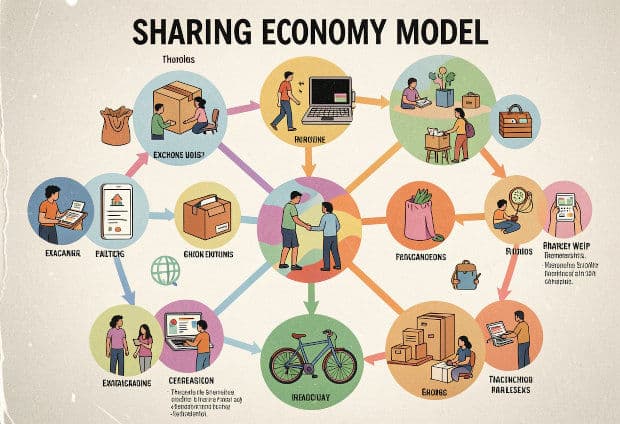
The sharing economy is a peer-to-peer business model where the main company acts as a middleman — connecting people who have something to offer with people who need it. The company itself does not own the product or service being exchanged. Instead, it uses technology to bring two sides together: the service provider and the service receiver. Pathao in Bangladesh, Uber globally, and Airbnb worldwide are all perfect real-world examples of this model in action. Simply put, the sharing economy turns unused assets into income-generating opportunities — for everyone involved.